
The Ultimate Cybersecurity Checklist: Ensure Your Digital Safety

Ready to reclaim your time and boost your productivity? At UltimateLifeHacks, we're dedicated to simplifying your life with practical, actionable tips. But in today's digital world, security is paramount. That's why we've crafted the ultimate Cybersecurity Checklist for Beginners, your first step towards a safer and more efficient online experience. Dive in and discover how easy it is to protect yourself – your peace of mind is just a click away!
- Cybersecurity Checklist for Beginners: Protecting Your Digital Life
- Securing Your Devices: Laptops, Smartphones, and Tablets
- Online Privacy and Data Protection
- Safe Online Practices: Best Practices for Digital Security
- Cyber Security Checklist for Beginners: Home Network Security
- Creating a Robust Cybersecurity Plan: A Step-by-Step Guide
-
Frequently Asked Questions
- What is a cybersecurity checklist, and why do I need one?
- How can I create a basic cybersecurity checklist for beginners?
- What are some common cybersecurity threats I should be aware of?
- How often should I review and update my cybersecurity checklist?
- Where can I find more information and resources to improve my cybersecurity?
- Final Reflection: Securing Our Digital Future, One Checklist at a Time
- Unlock Your Digital Fortress: Take Charge of Your Online Security Now!
Cybersecurity Checklist for Beginners: Protecting Your Digital Life
Protecting your digital life in today's interconnected world is paramount. Cybersecurity threats are increasingly sophisticated and prevalent, targeting individuals and businesses alike. This comprehensive cybersecurity checklist for beginners provides actionable steps to bolster your digital defenses and mitigate risks.
We'll cover essential practices, from securing your passwords to understanding common threats, empowering you to navigate the digital landscape with confidence and peace of mind. This guide focuses on practical, easy-to-implement strategies, ensuring even those with limited technical expertise can significantly improve their online security. By the end, you'll have a solid understanding of the fundamental principles of cybersecurity and a personalized plan to protect your data and privacy.
Understanding Basic Cybersecurity Threats: Phishing, Malware, and Ransomware
The digital world presents a variety of threats. Understanding these threats is the first step towards effective protection. Let's examine some of the most common:
- Phishing: This involves deceptive attempts to acquire sensitive information such as usernames, passwords, and credit card details by masquerading as a trustworthy entity in electronic communication. Phishing attacks often come in the form of emails, text messages, or fake websites that mimic legitimate organizations. Be wary of unsolicited emails requesting personal information or containing suspicious links. Always verify the sender's identity before clicking on any links or providing sensitive data.
- Malware: This encompasses malicious software designed to damage, disrupt, or gain unauthorized access to computer systems. Malware can take many forms, including viruses, worms, Trojans, spyware, and ransomware. These threats can infect your devices through various means, such as downloading infected files, visiting malicious websites, or clicking on malicious links in emails. Keeping your software updated and using reputable antivirus software is crucial to prevent malware infections.
- Ransomware: A particularly insidious type of malware, ransomware encrypts your files and demands a ransom for their release. Prevention is key here; regular backups of your important data are crucial. Avoid opening suspicious attachments or clicking on unknown links. Additionally, be cautious about downloading software from untrusted sources.
Password Management: Choosing Strong and Unique Passwords
Strong and unique passwords are the cornerstone of a robust cybersecurity strategy. Weak or reused passwords significantly increase your vulnerability to attacks. Here's how to improve your password practices:
- Length: Aim for passwords that are at least 12 characters long. Longer passwords are significantly harder to crack.
- Complexity: Incorporate a mix of uppercase and lowercase letters, numbers, and symbols. Avoid using easily guessable information like birthdays or pet names.
- Uniqueness: Never reuse the same password across multiple accounts. If one account is compromised, attackers could gain access to others.
- Regular Changes: Periodically update your passwords, especially for sensitive accounts like banking and email.
Password Managers: Tools for Secure Password Storage
Managing numerous strong and unique passwords can be challenging. Password managers are specialized software applications designed to securely store and manage your passwords. They generate strong passwords, auto-fill login forms, and provide additional security features. Choosing a reputable password manager can significantly simplify password management and enhance your overall security posture. Consider the features and security practices of different password managers before making a selection.
Multi-Factor Authentication (MFA): Adding an Extra Layer of Security
Multi-factor authentication (MFA) adds an extra layer of security by requiring multiple forms of verification to access an account. Even if someone obtains your password, they'll still need another factor, such as a code sent to your phone or a biometric scan, to gain access. Enabling MFA wherever possible is a crucial step in protecting your accounts from unauthorized access. Many services now offer MFA; take advantage of this important security feature to significantly reduce your risk.
Software Updates: Keeping Your Systems Secure
Regular software updates are paramount to maintaining a strong cybersecurity posture. These updates often include critical security patches that address vulnerabilities exploited by malicious actors. Neglecting updates leaves your systems exposed to a wide range of threats, from malware infections to data breaches. Think of it like this: your software is a house, and updates are the security upgrades – new locks, reinforced doors, and improved alarm systems. Without them, burglars (hackers) have an easier time breaking in.
Updating Operating Systems and Applications
Operating systems (like Windows, macOS, or Linux) and applications (like your web browser, email client, or antivirus software) should be updated as soon as updates become available. These updates often contain security patches that fix known vulnerabilities. For example, a recent update to a popular web browser might patch a flaw that allows malicious websites to inject malware onto your computer.
Failing to update your operating system leaves you vulnerable to exploits that could allow hackers to gain control of your entire system. Similarly, neglecting application updates can expose sensitive data or compromise your privacy. Prioritize updating your most frequently used software first.
It's crucial to understand the difference between minor updates (which often address minor bugs and performance improvements) and major updates (which usually include significant new features and security enhancements). While minor updates are important, major updates often include more critical security fixes and should be prioritized. Always check your software's release notes to understand the nature and importance of each update.
Automating Software Updates for Maximum Protection
Manually checking for and installing updates for every piece of software you use is tedious and prone to human error. Fortunately, most operating systems and applications offer automatic update features. Enabling these features ensures that your systems are always up-to-date with the latest security patches, minimizing your risk of being exploited. For example, Windows Update automatically downloads and installs updates in the background, often requiring only a system restart. Similarly, many applications provide options to automatically check for and install updates.
Automating software updates is a crucial step in proactive cybersecurity. This simple action significantly reduces the chances of overlooking critical updates, thereby strengthening your overall security posture. However, it's important to note that some updates might require a restart, potentially interrupting your workflow. Consider scheduling updates during off-peak hours to minimize disruption. While automation is key, it's still advisable to periodically review your update settings and ensure that automatic updates are enabled for all critical software. This proactive approach helps ensure that your digital life remains protected.
Securing Your Devices: Laptops, Smartphones, and Tablets
This section focuses on the fundamental steps to secure your personal devices – laptops, smartphones, and tablets – against cyber threats. These are the front lines of your digital defense, and neglecting their security leaves you vulnerable. A robust cybersecurity checklist for beginners must prioritize this area. We'll explore key strategies to bolster your device's defenses.
Device Passcodes and Biometric Authentication
Strong passcodes are the first line of defense against unauthorized access. Avoid simple passwords like "1234" or "password." Instead, opt for complex alphanumeric passwords, ideally exceeding 12 characters and incorporating uppercase and lowercase letters, numbers, and symbols. Consider using a password manager to generate and securely store these complex passwords. Password managers, while requiring their own secure master password, dramatically improve your overall cybersecurity posture.
Beyond passwords, biometric authentication offers an additional layer of security. Fingerprint scanners and facial recognition technology provide a convenient and highly secure way to unlock your devices. However, remember that even biometric authentication can be vulnerable if not properly implemented and managed by the device manufacturer. Always check for software updates that improve the security of your biometric authentication system. Consider enabling secondary authentication methods, such as a PIN or passcode, as a backup in case your biometric data is compromised.
Antivirus and Antimalware Software: Essential Protection
Installing and maintaining robust antivirus and antimalware software is crucial. These programs act as your digital immune system, proactively scanning for and removing malicious software. Free options exist, but paid versions often offer more comprehensive protection, including real-time monitoring and advanced features like ransomware protection.
Remember that relying solely on built-in security features is insufficient. Operating systems provide a base level of security, but dedicated antivirus and antimalware software provide far more comprehensive scanning and protection against evolving threats. Choosing reputable software from well-known vendors is paramount. Regularly update your antivirus software to benefit from the latest virus definitions and security patches. This ensures your protection remains effective against emerging threats.
Regular Security Scans and Malware Removal
Regular security scans are essential to identify and remove potential threats before they cause damage. Schedule automatic scans at least once a week, or even daily if you frequently download files from untrusted sources. Don't ignore warnings or notifications from your security software; investigate them promptly.
If malware is detected, follow the instructions provided by your antivirus software to remove it. In some cases, a full system scan may be necessary to ensure complete eradication of the malware. Consider using a separate malware removal tool if your primary antivirus software fails to completely remove a threat. Remember that regular updates to your operating system and applications are also critical for patching security vulnerabilities that malware might exploit. Staying vigilant and performing regular scans helps maintain a secure digital environment. This is a key component of any effective cybersecurity checklist for beginners.
Online Privacy and Data Protection
Protecting your digital life necessitates a proactive approach to online privacy and data protection. This isn't just about avoiding malware; it's about safeguarding your personal information from identity theft, data breaches, and unwanted surveillance. A robust cybersecurity checklist for beginners should prioritize these crucial aspects. Failing to do so leaves you vulnerable to a range of serious consequences, from financial loss to reputational damage. Let's delve into the specifics.
Protecting Your Personal Information Online
Protecting your personal information online requires a multi-layered approach. Think of it like building a fortress: you need strong walls (passwords), sturdy gates (security software), and vigilant guards (awareness). First, be mindful of what information you share online. Avoid posting sensitive details like your full address, phone number, or social security number on public platforms. Even seemingly innocuous information, when pieced together, can be used for identity theft.
Secondly, utilize strong, unique passwords for every online account. Avoid easily guessable passwords like "password123" or your birthday. Consider using a password manager to generate and securely store complex passwords. A good password manager will also alert you to potential data breaches affecting your accounts. Remember, password security is paramount in a comprehensive cybersecurity checklist for beginners.
Finally, be wary of phishing attempts. These scams often appear as legitimate emails or websites, attempting to trick you into revealing your personal information. Always verify the sender's identity before clicking on links or responding to requests for sensitive data. Look for inconsistencies in email addresses, website URLs, and the overall tone of the communication. A suspicious email should be reported immediately to the relevant authorities. Think twice before clicking!
Secure Browsing Habits: Avoiding Phishing Scams
Navigating the digital world safely requires developing secure browsing habits. Phishing scams represent a significant threat, and understanding how to identify and avoid them is crucial for maintaining online security. A strong cybersecurity checklist for beginners must include robust phishing prevention strategies.
One key tactic is to carefully examine website URLs. Legitimate websites typically have secure connections (HTTPS), indicated by a padlock icon in the address bar. Be wary of websites with unusual URLs or those that request sensitive information without a clear reason. Hovering your mouse over links before clicking can reveal the actual destination URL, helping to identify potentially malicious links.
Another essential aspect is verifying the sender's identity in emails and messages. Legitimate organizations rarely request personal information via email. If you receive an email asking for your password, bank details, or other sensitive information, it's highly likely a phishing attempt. Contact the organization directly through official channels to verify the authenticity of the request. Remember, legitimate companies will never ask for your password via email.
Cookies, while useful for personalized browsing experiences, can also pose a privacy risk if not managed correctly. Understanding how cookies work and configuring your browser's privacy settings is an essential part of a comprehensive cybersecurity checklist for beginners.
Modern browsers offer various privacy settings, allowing you to control which cookies are accepted and how your browsing data is handled. Consider enabling features like "Do Not Track" and clearing your browsing history and cookies regularly. Review your browser's privacy policy to understand how your data is collected and used. Furthermore, utilizing browser extensions that enhance privacy and block trackers can significantly improve your online security posture.
By taking control of your browser settings, you're actively contributing to a stronger defense against online threats. Take the time to understand and adjust these settings; it’s a small effort with big rewards in terms of online privacy. Remember, informed users are safer users.
Safe Online Practices: Best Practices for Digital Security
This section details crucial online safety practices forming the bedrock of a robust cybersecurity strategy, particularly vital for beginners navigating the digital world. These practices go beyond simply having a strong password; they encompass a holistic approach to minimizing your digital footprint and protecting your personal information.
Public Wi-Fi Safety: Avoiding Public Network Risks
Public Wi-Fi networks, while convenient, present significant cybersecurity risks. Connecting to unsecured networks exposes your data to potential interception by malicious actors. Criminals can easily eavesdrop on your online activities, stealing sensitive information like passwords, credit card details, and personal communications. Think of it like leaving your front door unlocked – an invitation for trouble.
To mitigate these risks, consider these crucial steps:
- Avoid sensitive transactions: Never access online banking, make online purchases, or share sensitive information (like passwords or credit card details) on public Wi-Fi. The risk of data breaches is simply too high.
- Use a VPN: A Virtual Private Network (VPN) encrypts your internet traffic, creating a secure tunnel between your device and the internet. This makes it significantly more difficult for others to intercept your data, even on an unsecured network. Think of it as adding a layer of encryption to your communication.
- Enable two-factor authentication (2FA): 2FA adds an extra layer of security to your accounts, requiring a second form of verification (like a code sent to your phone) in addition to your password. This significantly reduces the risk of unauthorized access, even if your password is compromised.
- Check the network name carefully: Be wary of networks with names that look similar to legitimate ones (e.g., "Free Airport Wi-Fi" versus "Free_Airport_Wi-Fi"). Malicious hotspots often masquerade as legitimate networks to trick unsuspecting users.
- Turn off Wi-Fi when not needed: Disconnecting from public Wi-Fi when you're not actively using it is a simple but effective way to reduce your exposure to risks.
Secure Online Shopping and Transactions
Online shopping offers unparalleled convenience, but it also presents unique cybersecurity challenges. Protecting yourself from fraud and data breaches while shopping online requires vigilance and the adoption of secure practices.
Here's how to ensure secure online transactions:
- Verify website security: Look for "HTTPS" in the website address bar (the "s" stands for secure). This indicates that the website uses encryption to protect your data during transmission. Also, look for a padlock icon next to the URL.
- Use strong passwords and unique credentials: Avoid reusing passwords across different websites. A password manager can help you generate and manage strong, unique passwords for each account.
- Pay attention to suspicious emails and links: Be cautious of emails or messages requesting personal information or directing you to unfamiliar websites. Legitimate businesses rarely request such information via email.
- Use reputable payment gateways: Stick to well-known and trusted payment gateways like PayPal or credit card processors with strong security measures.
- Review your bank and credit card statements regularly: Monitor your accounts for any unauthorized transactions. This allows you to detect and report fraudulent activity promptly.
Social media platforms are integral to modern life, but they also present significant cybersecurity risks. Over-sharing personal information can make you vulnerable to identity theft, stalking, or other forms of online harassment. Protecting your online reputation requires careful consideration of what you share and who you share it with.
Here are some key social media safety tips:
- Review your privacy settings: Regularly review and adjust your privacy settings on all social media platforms to control who can see your posts, photos, and other information.
- Be mindful of what you share: Avoid posting sensitive information like your home address, phone number, or workplace details. Remember, once something is online, it's difficult to remove completely.
- Think before you post: Before sharing anything, consider whether you would be comfortable with your employer, family, or potential future employer seeing it. A momentary lapse in judgment can have lasting consequences.
- Beware of phishing scams: Be wary of suspicious messages or links on social media that might try to trick you into revealing personal information or downloading malware.
- Report suspicious activity: If you encounter any suspicious activity or harassment on social media, report it to the platform immediately. Many platforms have robust reporting mechanisms in place.
This cybersecurity checklist for beginners provides a solid foundation for safer online practices. Remember, staying informed and proactive is key to navigating the digital world safely and securely. 🛡️
Cyber Security Checklist for Beginners: Home Network Security
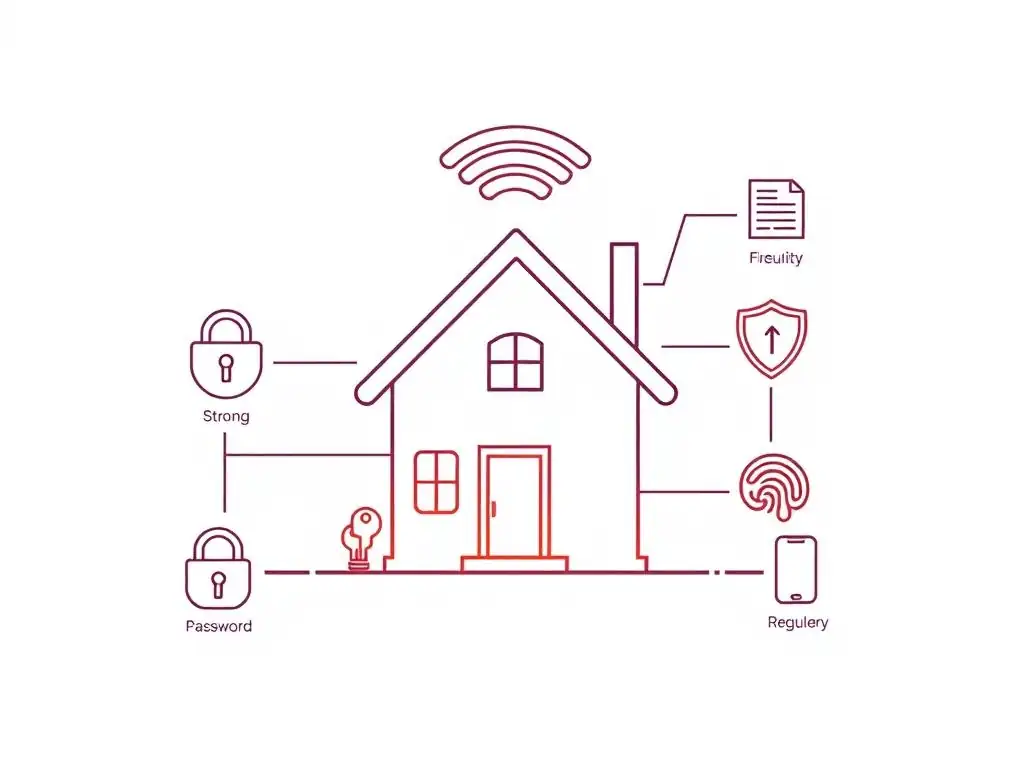
This section focuses on securing your home network, a crucial first step in establishing a robust cybersecurity posture. Even beginners can implement these measures to significantly reduce their vulnerability to online threats. Remember, a strong home network is the foundation of your overall digital safety.
Securing Your Home Wi-Fi Network
A weak or unsecured Wi-Fi network is an open invitation for cybercriminals. Here's how to bolster your home network's defenses:
- Strong Passwords are Paramount: Avoid easily guessable passwords like "password123". Instead, use a strong password with a mix of uppercase and lowercase letters, numbers, and symbols. Aim for at least 12 characters. Password managers can help you generate and securely store complex passwords. Consider using a passphrase – a longer, more memorable phrase – for enhanced security. For example, instead of "P@$$wOrd1", use "MyDogIsABeagle2024! ".
- Enable WPA3 Encryption: WPA3 is the latest Wi-Fi security protocol, offering significantly improved protection against attacks compared to older protocols like WPA2. Ensure your router supports WPA3 and that it's enabled. Check your router's manual or online documentation for instructions. This is a crucial step for beginners often overlooked.
- Regular Password Changes: While inconvenient, changing your Wi-Fi password every 3-6 months is a proactive measure that significantly reduces the risk of unauthorized access. This simple act can prevent many potential breaches.
- Hide Your SSID: Broadcasting your SSID (network name) makes it easier for attackers to find your network. Disabling SSID broadcasting makes your network less visible, adding an extra layer of protection. However, remember you will need to manually enter your SSID and password when connecting new devices.
- Use a Guest Network: Create a separate guest network for visitors. This isolates guest devices from your primary network, preventing them from accessing sensitive information. This simple step offers a substantial improvement in security for beginners.
A firewall acts as a gatekeeper for your network, blocking unauthorized access attempts. Most routers come with built-in firewalls, but it's crucial to ensure they are enabled and properly configured.
- Enable the Built-in Firewall: Verify that your router's firewall is activated. Consult your router's documentation for instructions on how to check and enable this essential security feature. Leaving it disabled leaves your network vulnerable.
- Understand Firewall Settings: While most default settings are sufficient for basic protection, understanding your firewall's options can enhance its effectiveness. Learn about port forwarding and other advanced settings only if necessary, as incorrect configuration can compromise security.
- Consider a Software Firewall: While your router's firewall is vital, a software firewall on your individual computers provides an additional layer of protection. Most operating systems include a built-in firewall; ensure it's enabled and configured to your needs.
- Regular Updates: Keep your router's firmware and your software firewall updated. These updates often include security patches that address vulnerabilities discovered by security researchers. Ignoring these updates leaves your firewall weaker and more vulnerable.
Regular Network Security Audits
Regularly auditing your network's security is essential for maintaining optimal protection. This involves reviewing your security measures and identifying potential weaknesses.
- Password Review: Periodically review all passwords associated with your network, including the Wi-Fi password, router admin password, and passwords for any connected devices. Replace weak or compromised passwords immediately.
- Firmware Updates: Check for and install firmware updates for your router regularly. Manufacturers release updates to address security vulnerabilities, so keeping your router's firmware up-to-date is crucial.
- Device Inventory: Maintain an inventory of all devices connected to your network. This helps you identify any unauthorized devices that may have gained access.
- Security Scans: Use online security scanners to check for vulnerabilities in your network. While not a replacement for other security measures, these scans can identify potential weaknesses that you might have missed. Remember to use reputable and trustworthy scanners.
By diligently following this cybersecurity checklist, even beginners can significantly improve their home network security and protect themselves from a wide range of online threats. Remember, proactive security is the best security.
Creating a Robust Cybersecurity Plan: A Step-by-Step Guide
This section provides a practical, step-by-step guide to building a robust cybersecurity plan, tailored specifically for beginners. We'll move beyond generic advice and delve into actionable steps you can take today to improve your digital safety. This guide focuses on creating a personalized cybersecurity checklist for beginners, ensuring you understand the "why" behind each step, not just the "how."
Assessing Your Current Security Posture
Before implementing any new security measures, it's crucial to understand your current vulnerability landscape. This involves a thorough assessment of your existing security practices and identifying potential weaknesses. Think of this as a digital health check-up.
Many beginners overlook this critical first step. They jump straight into installing antivirus software without considering the broader picture. A comprehensive assessment should include:
- Password Management: Do you reuse passwords across multiple accounts? This is a major vulnerability. A strong, unique password for each account is paramount. Consider using a password manager to simplify this process. Weak passwords are a common entry point for cybercriminals.
- Software Updates: Are your operating systems, applications, and antivirus software up-to-date? Outdated software often contains known vulnerabilities that hackers can exploit. Enable automatic updates whenever possible. Regular updates are your first line of defense against emerging threats.
- Phishing Awareness: How well can you identify phishing emails or suspicious links? Phishing remains a significant threat. Learning to spot the red flags in suspicious communications is essential. Regular training and awareness are key to avoiding phishing scams.
- Device Security: Do you use strong screen locks on your devices (computers, smartphones)? Are your devices protected by firewalls? This includes both software and hardware firewalls. A secure device is your personal digital fortress.
- Data Backup: Do you regularly back up your important data? Data loss can be devastating. Regular backups to a separate, secure location are essential for data recovery in case of a cyberattack or hardware failure. Consider cloud backups for offsite protection.
Table 1: Self-Assessment Checklist for Cybersecurity Posture
| Area | Current Status | Action Needed |
|---|---|---|
| Password Management | Implement a password manager; create strong, unique passwords | |
| Software Updates | Enable automatic updates; check for updates manually | |
| Phishing Awareness | Complete online phishing awareness training | |
| Device Security | Enable strong screen locks; ensure firewall protection | |
| Data Backup | Implement regular data backup strategy |
Implementing Security Measures: A Practical Approach
Once you've assessed your current security posture, you can begin implementing practical security measures to strengthen your defenses. This involves a multi-layered approach, combining various techniques to maximize protection.
Here are some key steps to take:
- Install and maintain robust antivirus software: This is crucial for detecting and removing malware. Keep it updated regularly and run scans frequently. This is the foundation of a secure system.
- Enable two-factor authentication (2FA) whenever possible: This adds an extra layer of security to your accounts, making it much harder for attackers to gain unauthorized access. 2FA is a simple yet powerful security enhancement.
- Use strong and unique passwords for all accounts: Avoid using easily guessable passwords and never reuse passwords across different accounts. This is a fundamental principle of cybersecurity.
- Be cautious when clicking on links or opening attachments in emails: Always verify the sender's identity before clicking on any links or opening attachments. This helps prevent phishing attacks.
- Regularly update your software and operating systems: This is essential for patching security vulnerabilities and protecting against malware. Keeping your systems updated is an ongoing process.
- Educate yourself about cybersecurity threats: Stay informed about the latest threats and scams to better protect yourself. Continuous learning is crucial in the ever-evolving landscape of cybersecurity.
Regularly Reviewing and Updating Your Security Plan
Cybersecurity is an ongoing process, not a one-time fix. Regularly reviewing and updating your security plan is crucial to ensure it remains effective. Threats evolve, and so should your defenses.
Think of this as preventative maintenance for your digital life. Here’s what you should do:
- Review your password management practices at least annually: Check for weak or reused passwords and update them as needed. Password hygiene is a continuous effort.
- Conduct regular security audits: Assess your security posture at least twice a year to identify any new vulnerabilities. Regular audits are like checkups for your digital health.
- Stay informed about the latest cybersecurity threats: Keep up-to-date on emerging threats and adjust your security measures accordingly. Staying informed is essential for adapting to new threats.
- Update your security software and operating systems regularly: Automatic updates are your friend. Regular updates are crucial for maintaining a secure system.
- Back up your data regularly: This ensures you can recover your data in case of a cyberattack or hardware failure. Regular backups are a safety net.
By following these steps and regularly reviewing your cybersecurity plan, you'll significantly reduce your risk of becoming a victim of a cyberattack. Remember, a proactive approach is key to maintaining your digital safety. This cybersecurity checklist for beginners provides a strong foundation for building a secure digital life.
Frequently Asked Questions
What is a cybersecurity checklist, and why do I need one?
A cybersecurity checklist is a list of essential steps to protect your digital life. It helps you identify vulnerabilities and take action to prevent cyberattacks, protecting your data and privacy. It's crucial in today's digital world.
How can I create a basic cybersecurity checklist for beginners?
Start with strong passwords for all accounts, enable two-factor authentication where possible, and keep your software updated. Regularly back up your data and be cautious of phishing emails and suspicious links.
What are some common cybersecurity threats I should be aware of?
Common threats include phishing scams, malware, ransomware, and data breaches. Understanding these threats will help you identify and avoid them more effectively. Be vigilant and educate yourself.
How often should I review and update my cybersecurity checklist?
You should regularly review and update your checklist, at least quarterly, or whenever new threats emerge or you change devices or software. Staying informed about the latest threats is key to maintaining strong security.
Where can I find more information and resources to improve my cybersecurity?
Many reputable websites, like the UltimateLifeHacks website, offer comprehensive guides and tutorials on cybersecurity best practices. Government agencies and cybersecurity organizations also provide valuable resources and information.
Final Reflection: Securing Our Digital Future, One Checklist at a Time
The digital world is no longer a luxury; it's the fabric of modern life, and our safety within it is paramount. Ignoring cybersecurity best practices is no longer an option; it's a gamble with potentially devastating consequences, impacting everything from our financial security to our personal privacy. This checklist isn't just a list of steps; it's a roadmap to navigating the increasingly complex digital landscape with confidence and peace of mind.
The pervasiveness of cyber threats underscores the urgent need for proactive digital citizenship. We've seen firsthand the devastating impact of data breaches and online scams, highlighting the vulnerability of even the most tech-savvy individuals. The constant evolution of these threats demands continuous learning and adaptation. As Bruce Schneier wisely stated, Security is a process, not a product.
This means that our vigilance and commitment to cybersecurity must be ongoing, reflecting the dynamic nature of the threats we face. This checklist is a starting point, a foundation upon which we can build a stronger, more secure digital future.
Now, it's your turn. Take a moment to review the checklist, not just as a list of tasks, but as a commitment to your own digital well-being. Identify your vulnerabilities, implement the strategies outlined, and empower yourself with the knowledge to protect your digital life. Remember, securing your digital world is an investment in your future – a future where you can confidently connect, create, and thrive online without fear. Start today, and build a safer tomorrow.
Unlock Your Digital Fortress: Take Charge of Your Online Security Now!
Taking control of your online security is crucial in today's digital world. This checklist provides the knowledge you need to significantly improve your digital safety. Let's put that knowledge into action.
- Prioritize password management: Immediately review your passwords and use a reputable password manager. This is the single most effective step you can take to protect yourself online.
- Strengthen your defenses: Enable two-factor authentication on all important accounts and install a reliable antivirus program if you haven't already. Regular software updates are also vital.
- Share this vital information: Help protect your friends and family by sharing this article. You could make a real difference in their lives!
Ready to build an impenetrable digital shield? What's the first step you will take to enhance your online security today?