
The Secret to Perfect Sound: Smart Speakers and Audio Optimization

Ready to unlock the hidden potential of your smart home? At UltimateLifeHacks, we're dedicated to simplifying your life with practical tips and tricks. Discover how to effortlessly enhance your everyday experience, starting with our latest guide on optimizing smart speaker audio. Imagine crystal-clear sound, perfectly tuned to your environment – learn the secrets to achieving this and more, right here. Let's dive in!
- Understanding Your Smart Speaker's Audio Capabilities
-
Optimizing Smart Speaker Placement for Superior Sound
- Avoiding Common Placement Mistakes: Poor Speaker Positioning and its Impact on Audio Quality
- The Importance of Room Acoustics: Minimizing Reflections and Echo
- Strategic Placement for Optimal Stereo Imaging: Positioning Multiple Speakers for Enhanced Soundstage
- Experimenting with Speaker Height and Orientation: Fine-tuning for Best Results
- Enhancing Smart Speaker Audio with External Accessories
- Advanced Techniques for Smart Speaker Audio Optimization
- Troubleshooting Common Smart Speaker Audio Issues
- Maximizing Your Smart Speaker's Potential: Beyond the Basics
-
Frequently Asked Questions
- How can I optimize the audio quality of my smart speaker?
- What if my smart speaker's sound is muffled or distorted?
- Are there any external devices I can use to improve my smart speaker's sound?
- How can I reduce background noise interference when using my smart speaker?
- My smart speaker sounds too quiet. How can I increase the volume without distorting the audio?
- Final Reflection: The Symphony of Sound: Shaping Our Auditory Future
- Unleash the Power of Perfect Sound!
Understanding Your Smart Speaker's Audio Capabilities
Smart speakers have revolutionized how we consume audio, seamlessly integrating music, podcasts, and audiobooks into our daily lives. However, achieving truly perfect sound from these convenient devices requires more than just plugging them in. This article delves into the intricacies of optimizing your smart speaker's audio, exploring the factors that influence sound quality and providing practical strategies to elevate your listening experience.
We'll uncover the secrets to transforming your smart home into a haven of pristine audio, ensuring you get the most out of your investment and enjoy unparalleled sound quality. From understanding the technical specifications to choosing the right speaker for your space, we'll equip you with the knowledge to effectively optimize smart speaker audio. Get ready to unlock the full sonic potential of your smart home entertainment system!
Choosing the Right Smart Speaker for Your Needs: Size Matters
The size of your smart speaker significantly impacts its audio capabilities. Larger speakers generally offer more robust bass response and a wider soundstage, creating a richer, more immersive listening experience. Smaller speakers, while convenient and portable, often lack the low-end power and clarity of their larger counterparts. Consider the size of the room where you'll be placing the speaker.
A small speaker in a large room will sound thin and weak, while a large speaker in a small room may overpower the space. Think about your typical listening volume; a larger speaker may be necessary if you prefer louder playback. Choosing the right size ensures a balanced and enjoyable sound, optimizing your audio experience from the outset.
Bass Response and Room Size Considerations: Matching Speaker to Environment
Bass response is crucial for a full and satisfying sound. However, the ideal bass level depends heavily on your room's acoustics. Small rooms tend to amplify bass frequencies, potentially leading to a muddy or boomy sound. Large rooms, conversely, may require a speaker with more powerful bass to fill the space adequately. Consider the materials in your room.
Hard surfaces like concrete or glass reflect sound, while soft furnishings like carpets and curtains absorb it. Experiment with placement – moving your speaker a few inches can dramatically alter the bass response. For example, positioning your speaker away from corners often reduces excessive bass buildup. Remember, optimizing your speaker's placement is just as important as choosing the right speaker for the environment.
Analyzing Frequency Response Curves: Decoding Technical Specifications for Optimal Sound
Manufacturers often provide frequency response curves in their smart speaker specifications. These curves illustrate the speaker's output at different frequencies (bass, midrange, treble). A flat curve indicates a balanced sound across the frequency spectrum. However, slight variations can be desirable, depending on your personal preferences and the type of music you listen to.
Understanding these curves allows you to choose a speaker tailored to your listening needs. For instance, a speaker with a boosted bass response might be ideal for listening to hip-hop, while one with a more prominent treble response might suit classical music. Don't be afraid to delve into the technical details; they hold the key to truly optimizing smart speaker audio.
Top 5 Smart Speakers for Crystal Clear Audio in 2024
Determining the absolute "top 5" requires extensive testing and subjective evaluation across various audiophile preferences. However, several brands consistently deliver high-quality audio. Factors like brand reputation, user reviews, and technological innovations play a role in determining a speaker's rank. Consider factors beyond raw audio quality like smart features, app integration, and ease of use when making your final decision.
Remember, the best smart speaker for you depends on your individual needs and preferences. [Specific information pending: Detailed list of 5 smart speakers with brief descriptions of their audio capabilities and key features]. Analyzing user reviews and professional testing is crucial for informed decision-making.
Optimizing Smart Speaker Placement for Superior Sound
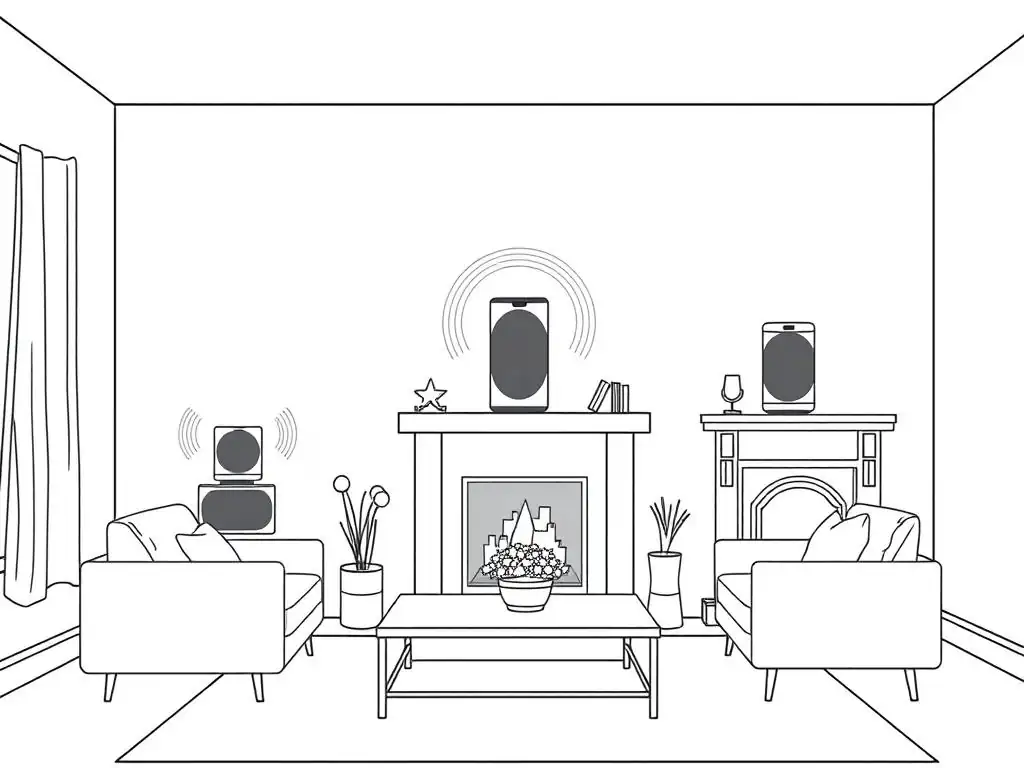
Optimizing your smart speaker's audio quality isn't just about the device itself; it's significantly about its placement within your environment. A poorly positioned speaker can drastically diminish its potential, leading to muffled sound, distorted audio, and a generally underwhelming listening experience. This section focuses on maximizing your smart speaker's audio performance through strategic placement techniques. We'll explore common pitfalls and offer practical solutions to help you achieve the best possible sound quality from your smart home audio system. Mastering smart speaker placement is key to truly optimizing your smart speaker audio.
Avoiding Common Placement Mistakes: Poor Speaker Positioning and its Impact on Audio Quality
Many people make the mistake of placing their smart speakers in visually convenient locations, disregarding the impact on sound quality. This often leads to subpar audio reproduction. Let's examine some common errors and their consequences:
- Placing the speaker in a corner: While seemingly convenient, corners create excessive bass buildup and reflections, muddying the overall sound. The low frequencies become exaggerated, making the audio sound "boomy" and lacking clarity. This is especially true for smaller rooms where sound waves have less space to dissipate.
- Positioning near reflective surfaces: Hard surfaces like walls, windows, and furniture reflect sound waves, creating unwanted echoes and reverberations. These reflections interfere with the direct sound from the speaker, leading to a less defined and less precise audio experience. The result is a "smeared" sound, lacking in detail and clarity.
- Obstructing the speaker's front: Placing objects in front of the speaker, such as curtains or bookshelves, will absorb or deflect sound waves, resulting in a weaker and less detailed sound. The speaker's sound dispersion is compromised, reducing its overall performance.
- Ignoring the speaker's height: The height of the speaker impacts the sound dispersion. Placing it too low can result in a "boomy" bass response and a lack of treble clarity. Conversely, placing it too high can lead to a harsh and unbalanced sound. Ideally, the tweeter (high-frequency driver) should be at ear level for optimal listening.
The Importance of Room Acoustics: Minimizing Reflections and Echo
Room acoustics play a crucial role in optimizing smart speaker audio. Understanding how sound waves behave in your room is essential for achieving the best possible listening experience. Hard surfaces reflect sound, while soft surfaces absorb it. By strategically managing these reflections, you can minimize unwanted echoes and reverberations, resulting in cleaner, clearer audio.
Here are some strategies to improve room acoustics:
- Use acoustic treatment: Acoustic panels or diffusers can absorb or scatter sound waves, reducing reflections and improving sound clarity. Consider placing these panels on reflective surfaces like walls or windows.
- Rearrange furniture: Moving furniture around can significantly alter the room's acoustics. Experiment with different arrangements to find one that minimizes reflections and maximizes sound quality.
- Add rugs and carpets: Rugs and carpets absorb sound, reducing reverberation and improving sound clarity. They are particularly effective in hardwood or tile floors.
- Consider the room's shape and size: Room shape and size influence how sound waves behave. Rectangular rooms, for instance, are more prone to standing waves (areas of excessive bass buildup).
Strategic Placement for Optimal Stereo Imaging: Positioning Multiple Speakers for Enhanced Soundstage
For a truly immersive listening experience, consider using multiple smart speakers to create a stereo or multi-channel sound system. Strategic placement is crucial for achieving optimal stereo imaging—the ability to accurately perceive the location of sounds within the soundscape.
To optimize stereo imaging:
- Maintain equal distances: Ensure both speakers are equidistant from the primary listening position. This ensures a balanced soundstage.
- Toe-in the speakers: Slightly angle the speakers towards the listening position to create a more focused sound. Experiment with different angles for optimal results.
- Avoid placing speakers too close together: Spacing the speakers appropriately allows for a wider, more spacious soundstage. The ideal distance depends on the room's size and the speaker's characteristics.
- Consider speaker height: As mentioned before, maintaining the same speaker height for both speakers is crucial for consistency.
By carefully considering these factors and experimenting with different placements, you can significantly enhance the audio quality of your smart speaker system, transforming your listening experience. Remember, optimizing smart speaker audio is an iterative process; fine-tuning is key to achieving the perfect sound for your space.
Experimenting with Speaker Height and Orientation: Fine-tuning for Best Results
Optimizing the placement of your smart speaker is crucial for achieving the best possible sound quality. Simply placing it on a shelf or table isn't always ideal. The height and orientation of the speaker significantly impact how sound waves propagate and reflect within your room, affecting the overall listening experience. Experimentation is key to finding the sweet spot.
Consider the placement of reflective surfaces in your room. Hard surfaces like walls, floors, and windows can reflect sound waves, creating echoes or muddying the sound. By carefully adjusting the speaker's height, you can minimize these unwanted reflections and achieve a cleaner, more defined sound. For instance, raising the speaker a few inches off a surface can often dramatically improve clarity. This is especially true for low-frequency sounds, which tend to be more affected by floor reflections.
The speaker's orientation also plays a vital role. Most smart speakers are designed to project sound in a specific direction, often forward. However, slightly tilting the speaker upwards or downwards can influence the sound dispersion. Experiment with tilting it slightly upwards to direct the sound towards your listening position. This is particularly beneficial in rooms with high ceilings, where sound can get lost. Conversely, tilting it slightly downwards can be helpful in rooms with low ceilings to prevent sound from bouncing off the ceiling and creating unwanted reverberations.
Don't underestimate the impact of minor adjustments. Moving the speaker even a few centimeters can make a noticeable difference. Try placing it in different positions within the room, paying close attention to the sound quality at your usual listening spot. Take notes on your observations – for example, note the clarity of vocals, the depth of bass, and the overall balance of the sound.
This methodical approach will help you identify the optimal placement for your smart speaker. Remember that the perfect placement will depend on the specific acoustics of your room, the size and shape of the speaker, and your personal preferences. Don't be afraid to spend some time experimenting until you achieve the sound you desire. The rewards of optimized audio are well worth the effort!
Enhancing Smart Speaker Audio with External Accessories
Smart speakers, while convenient and increasingly sophisticated, often fall short in delivering truly immersive and high-fidelity audio. Optimizing smart speaker audio goes beyond simple volume adjustments; it involves strategically enhancing the speaker's inherent capabilities using external accessories. This section explores effective methods to improve bass response, clarity, and overall sound quality, transforming your smart speaker experience from adequate to exceptional. We'll focus on practical solutions, including readily available accessories and DIY options, to help you achieve optimal sound without breaking the bank.
Boosting Bass with Subwoofers: Choosing the Right Subwoofer for Your Smart Speaker
Many smart speakers, particularly compact models, struggle to reproduce deep, rich bass frequencies. Adding a subwoofer significantly improves low-frequency response, providing a fuller, more impactful sound. However, selecting the right subwoofer is crucial. Consider factors like the size of your room, the type of music you listen to, and the output power of your smart speaker.
A subwoofer that's too powerful for your speaker might distort the sound, while one that's too weak won't provide a noticeable improvement. Furthermore, wireless subwoofers offer greater flexibility in placement, allowing you to optimize bass distribution within your listening space. The goal is seamless integration, not overpowering the higher frequencies produced by your smart speaker. The correct subwoofer will augment, not overpower.
Recommended Subwoofers for Enhanced Low-Frequency Response
While specific product recommendations are beyond the scope of this article, consider these factors when choosing a subwoofer:
| Feature | Considerations |
|---|---|
| Size | Smaller rooms benefit from smaller subwoofers, while larger rooms require more power. |
| Power Output | Match the subwoofer's power to your smart speaker's output for optimal synergy. |
| Wireless Connectivity | Wireless subwoofers offer greater placement flexibility and cleaner aesthetics. |
| Frequency Response | Look for a subwoofer with a frequency response that extends into the deep bass range. |
| Price | Subwoofers range widely in price; find a balance between quality and budget. |
The optimal subwoofer for optimizing smart speaker audio will depend on your specific needs and preferences. Researching reviews and comparing specifications from reputable brands is essential before making a purchase.
Improving Clarity with Acoustic Panels: Reducing Reflections and Improving Sound Quality
The acoustic environment significantly impacts sound quality. Hard surfaces like walls and floors reflect sound waves, creating echoes and muddying the audio. Acoustic panels absorb these reflections, reducing unwanted reverberation and improving clarity. This is particularly beneficial in smaller rooms where sound reflections are more pronounced. By strategically placing acoustic panels, you can create a more controlled and balanced listening experience, allowing you to fully appreciate the nuances of your audio. This improves the overall listening experience and allows for better separation of instruments and vocals, making your smart speaker sound far more refined.
DIY Acoustic Treatment: Budget-Friendly Solutions for Sound Optimization
For a cost-effective approach to acoustic treatment, consider DIY solutions. Creating your own acoustic panels is surprisingly simple and requires readily available materials. For example, you can build panels using:
- Foam: Acoustic foam is readily available online and in home improvement stores. Different thicknesses and densities offer varying levels of absorption.
- Recycled Materials: Items like thick blankets or even moving blankets can be effectively used to dampen reflections, providing a temporary solution. These can be hung strategically on walls.
- Bookshelves: Strategically placed bookshelves can act as natural acoustic diffusers, scattering sound waves and reducing harsh reflections.
Remember that even simple DIY solutions can significantly improve the clarity and overall sound quality of your smart speaker. While professional acoustic treatment is ideal, these budget-friendly options offer a great starting point for optimizing your home audio environment. Experiment with placement and materials to find what works best for your space and listening preferences. The key is to absorb unwanted reflections and improve the overall acoustic balance of the room. This simple step can significantly enhance your enjoyment of music and podcasts played through your smart speaker.
Connecting External Amplifiers for Superior Power: Getting the Most Out of Your Smart Speaker
Connecting an external amplifier to your smart speaker can dramatically improve its audio output, especially if you're looking for louder, clearer sound in larger rooms or outdoor spaces. Many smart speakers, while convenient, have built-in amplifiers that are limited in power. This often results in distorted audio at higher volumes or a lack of bass response. An external amplifier acts as a powerful boost, significantly enhancing the speaker's capabilities.
The process of connecting an external amplifier varies depending on the type of amplifier and the smart speaker's output. Some smart speakers have a dedicated audio output (often a 3.5mm jack or RCA jacks), making the connection straightforward. You simply use the appropriate cables to connect the speaker's output to the amplifier's input. However, other smart speakers might only offer Bluetooth connectivity. In this case, you'll need a Bluetooth-enabled amplifier or a Bluetooth-to-RCA/3.5mm adapter to bridge the gap.
Choosing the right amplifier is crucial. The amplifier's power rating (measured in watts) should be appropriately matched to your smart speaker's capabilities. Using an amplifier that's too powerful could damage your speaker, while one that's too weak won't provide a noticeable improvement. Consider the size of the room or area where you'll be using the speaker. Larger rooms generally require more powerful amplification. Look for amplifiers with features like adjustable bass and treble controls to fine-tune the sound to your preferences. Additionally, some amplifiers offer additional connectivity options like multiple inputs for connecting other audio devices.
Remember to always consult your smart speaker's and amplifier's manuals for specific connection instructions and safety precautions. Improper connections can lead to damage or malfunction. Proper impedance matching between your speaker and the amplifier is also essential to avoid distortion and potential damage.
If you're unsure about any aspect of the process, it's best to seek professional assistance to ensure optimal performance and avoid any risks. Investing in high-quality cables is also recommended for a clean and noise-free audio signal. A properly connected and optimized system will reward you with a significantly improved listening experience, transforming your smart speaker's sound from adequate to exceptional.
Advanced Techniques for Smart Speaker Audio Optimization
This section delves into more advanced methods to truly optimize smart speaker audio, moving beyond basic placement and volume control. We'll explore techniques that allow you to fine-tune your listening experience and maximize the potential of your smart speaker system. Remember, even the best speaker can sound subpar without proper optimization.
Utilizing Equalizer Settings: Fine-tuning the Sound to Your Preferences
Equalizers (EQs) are powerful tools for shaping the sound signature of your smart speaker. They allow you to adjust the balance of different frequency ranges, resulting in a more personalized listening experience. Many smart speaker apps offer built-in EQ controls, providing a simple way to enhance your audio.
Understanding EQ Parameters: Bass, Treble, Midrange Adjustments
The core of EQ adjustment lies in understanding the frequency ranges:
- Bass: Low frequencies (generally below 250 Hz). Boosting bass can add warmth and fullness, but excessive bass can sound muddy and overwhelming. Reducing bass can clarify the sound, especially in smaller rooms.
- Midrange: The mid-frequencies (generally 250 Hz to 4 kHz). This range is crucial for vocals and instruments; adjustments here significantly impact clarity and presence. A balanced midrange is essential for natural sound.
- Treble: High frequencies (generally above 4 kHz). Boosting treble increases brightness and detail, but excessive treble can sound harsh or sibilant. Reducing treble can soften the sound and reduce harshness.
Experiment with small adjustments (+/- 2dB at a time) to find the sweet spot for your preferred listening style and the acoustic characteristics of your room. For example, if your room is small and sounds boomy, you might reduce the bass slightly. If vocals sound muffled, try increasing the midrange.
Presets vs. Custom EQ: Finding the Perfect Sound Profile for Your Music
Many smart speaker apps offer preset EQ profiles (e.g., "Rock," "Jazz," "Classical"). These presets provide a starting point, but creating a custom EQ profile tailored to your specific taste and listening environment often yields superior results.
| Preset Type | Description | Pros | Cons |
|---|---|---|---|
| Rock | Emphasizes bass and treble for a powerful sound. | Powerful, energetic sound | Can sound harsh or muddy depending on the track |
| Jazz | Balanced sound with a focus on midrange clarity. | Clear vocals and instrument separation | May lack punch for some genres |
| Classical | Emphasizes clarity and detail across the spectrum. | Detailed and nuanced sound | May sound thin or lacking in warmth |
| Custom | Allows for precise adjustments to all frequencies. | Highly personalized sound | Requires experimentation and understanding of EQ |
Start with a preset and then fine-tune it to your liking. Remember that the ideal EQ settings will vary depending on the music genre, the quality of the recording, and the acoustics of your room. Enjoy the process of experimentation! It's part of the fun of optimizing your smart speaker audio.
Calibrating Your Smart Speaker for Your Room: Using Built-in Room Correction Features
Room acoustics significantly impact sound quality. Hard surfaces like walls and floors can reflect sound waves, leading to uneven frequency response and poor soundstage. Some high-end smart speakers include built-in room correction features that automatically adjust the audio output to compensate for the acoustic characteristics of your room.
Room Calibration Apps and Software: Optimizing Sound Based on Your Environment
While some smart speakers have built-in room correction, many third-party apps and software solutions can further enhance sound quality by analyzing the room's acoustics and tailoring the audio output accordingly. These apps often use your smartphone's microphone to measure the sound reflections in your room and then apply digital signal processing (DSP) algorithms to optimize the sound. The effectiveness of these apps varies depending on the app itself and the quality of your speaker and room. Consider the features offered and user reviews before choosing one.
Remember that the process may require some patience and attention to detail for the best results. Think of it as fine-tuning your smart speaker for its unique environment, like a bespoke audio experience. 🔊
Exploring Multi-Room Audio Setup: Synchronizing Multiple Smart Speakers for Seamless Sound
Multi-room audio offers a significant upgrade to the single smart speaker experience, allowing you to enjoy consistent, synchronized sound throughout your home. This advanced technique transforms your living space into a personalized concert hall, seamlessly blending audio across different rooms. Optimizing this setup requires careful consideration of several factors, impacting both the audio quality and the overall listening experience.
One of the primary considerations is speaker placement. While the placement guidelines for a single smart speaker still apply (avoiding corners, placing speakers at ear level, etc. ), multi-room setups require additional strategic planning. Ideally, speakers should be relatively equidistant to minimize noticeable delays between audio signals.
Experimentation is key; try different placements to find the sweet spot for balanced sound across all rooms. Consider the physical layout of your home – walls, furniture, and other obstacles can significantly affect sound propagation, requiring adjustments to speaker positions to compensate for these factors. For instance, a large, open-plan living area might require more strategically placed speakers than a series of smaller, separated rooms.
Another crucial aspect is network stability. A robust and reliable home network is essential for seamless multi-room audio. Lag or interruptions in the network connection will directly translate to audio dropouts or synchronization issues. Ensure your Wi-Fi router is placed centrally and strategically to provide strong coverage throughout your home.
Consider using a mesh Wi-Fi system for even more reliable coverage, particularly in larger homes with multiple floors or thick walls. Upgrading your router to a model with higher bandwidth and better signal strength can also significantly improve the overall performance of your multi-room audio setup. Regularly monitoring your network speed and stability is recommended to proactively identify and address potential problems before they affect your audio quality.
Furthermore, choosing compatible smart speakers is paramount. While many smart speaker brands offer multi-room audio capabilities, ensure that all your speakers are compatible with the same ecosystem and support the same audio codecs. Using a mix of brands or models can lead to inconsistencies in sound quality and synchronization issues. Consider the audio capabilities of each speaker, ensuring they offer similar frequency responses and power outputs for a cohesive listening experience across all rooms.
The higher the quality of individual speakers, the better the overall multi-room audio experience will be. Investing in high-fidelity speakers will result in a more immersive and enjoyable listening experience compared to using budget-friendly options. Before purchasing additional speakers, carefully review compatibility information provided by the manufacturer to avoid potential complications.
Finally, optimizing the audio settings within your smart speaker's app is crucial. Many apps offer equalization (EQ) settings that allow you to fine-tune the audio output to compensate for room acoustics or personal preferences. Experiment with different EQ presets or custom settings to find the optimal balance for your multi-room setup. Consider factors like bass levels, treble clarity, and overall volume balance to achieve the desired sound profile.
Some apps also provide advanced settings for speaker grouping and audio delay compensation, allowing for further fine-tuning of synchronization and overall sound quality. Remember that the best settings will vary depending on the specific room, speaker placement, and personal preferences, so don't hesitate to experiment with different settings to achieve the perfect sound. Proper use of these settings is essential for achieving optimal sound quality and a unified listening experience across your entire home.
Troubleshooting Common Smart Speaker Audio Issues
This section dives deep into resolving common audio problems encountered with smart speakers, helping you achieve the perfect sound experience you deserve. Optimizing smart speaker audio involves understanding the potential issues and knowing how to tackle them effectively. We'll cover distortion, connectivity hiccups, and low volume problems, providing practical solutions for each.
Dealing with Distortion and Clipping: Identifying and Resolving Audio Problems
Distortion and clipping are frustrating audio problems that significantly impact the listening experience. Distortion manifests as a harsh, unpleasant sound, often characterized by a "fuzzy" or "grainy" quality. Clipping, on the other hand, results in a harsh, abrupt cutting off of the audio signal, often accompanied by a crackling or popping sound. Both issues typically stem from the speaker working too hard to reproduce the audio signal.
Several factors contribute to distortion and clipping. One common culprit is playing audio at excessively high volumes. Pushing your smart speaker beyond its limits leads to strained components and results in these unpleasant sonic artifacts. Another factor is the audio source itself; poorly compressed or low-quality audio files can easily overload the speaker's processing capabilities. Finally, the physical placement of the speaker within a room can influence sound quality. For example, placing the speaker in a corner or against a wall can amplify bass frequencies, potentially leading to distortion.
Here's a breakdown of how to address these issues:
- Lower the Volume: The simplest solution is often the most effective. Gradually reduce the volume until the distortion or clipping disappears. Listening at a comfortable, moderate volume will extend the life of your speaker and enhance the quality of the audio reproduction.
- Check Your Audio Source: Ensure that the audio files you are playing are of high quality. Avoid low-bitrate MP3s or other compressed formats which can lack the necessary dynamic range for optimal sound reproduction. Consider switching to higher-quality sources like FLAC or WAV files if possible.
- Optimize Speaker Placement: Experiment with repositioning your smart speaker. Moving it away from walls and corners can improve sound clarity and reduce unwanted bass build-up, mitigating the chances of distortion. Ideally, place your speaker in an open space where sound can freely propagate.
- Check for Physical Obstructions: Make sure nothing is blocking the speaker's woofer or tweeter. Dust, debris, or even a nearby object can impede sound output and lead to distortion.
Fixing Connectivity Issues: Troubleshooting Bluetooth and Wi-Fi Problems
Connectivity problems are a common source of frustration when using smart speakers. Issues with Bluetooth and Wi-Fi can interrupt playback, cause dropouts, or prevent the speaker from connecting altogether. Optimizing your smart speaker's audio often involves ensuring a stable and reliable connection.
Let's examine the typical causes and solutions:
- Bluetooth Connectivity: If you're using Bluetooth, ensure your source device (phone, tablet, computer) is within range of the speaker and that Bluetooth is enabled on both devices. Try pairing the devices again; sometimes, a simple re-pairing process can resolve connectivity issues. Interference from other Bluetooth devices can also be a factor, so try temporarily disabling other Bluetooth devices in the vicinity.
- Wi-Fi Connectivity: For Wi-Fi-enabled smart speakers, check your home network's stability. A weak Wi-Fi signal, network congestion, or router issues can cause interruptions. Consider moving the speaker closer to your router, improving your router's placement, or resetting your router if problems persist. Ensure your smart speaker's firmware is up to date, as updates often include bug fixes and improvements to network performance. Also, consider the potential for Wi-Fi interference from other devices.
Addressing Low Volume and Poor Sound Quality: Common Causes and Solutions
Low volume and poor sound quality can stem from various sources. Optimizing smart speaker audio requires identifying the root cause to effectively address the problem. Sometimes, the issue is simple; other times, it requires a more in-depth investigation.
Here are some potential causes and their solutions:
- Volume Settings: Double-check both the speaker's volume settings and the volume settings on your source device. It's easy to accidentally mute the speaker or set the volume too low.
- Equalizer Settings: Many smart speakers have built-in equalizers that allow you to adjust the balance of different frequencies. Experiment with different equalizer presets or manual adjustments to find a setting that suits your preferences and improves sound quality. An improperly configured equalizer can lead to a weak or unbalanced sound.
- Speaker Placement (Again!): As mentioned before, speaker placement plays a crucial role in sound quality. Improper placement can lead to a muffled or weak sound. Experiment with different locations to find the optimal position for your speaker.
- Firmware Updates: Outdated firmware can sometimes lead to performance issues. Check for available firmware updates for your smart speaker and install them to ensure you have the latest features and bug fixes. This is particularly important for improving audio performance and resolving known issues.
- Hardware Issues: In some cases, low volume or poor sound quality might indicate a hardware problem. If you've tried all the above steps and the issue persists, the speaker itself may require repair or replacement. Contact the manufacturer for support or warranty information.
By systematically addressing these common problems, you can significantly improve the audio quality of your smart speaker and enjoy a truly immersive listening experience. Remember, optimizing smart speaker audio is an iterative process; experimentation and careful observation are key to achieving the perfect sound.
Maximizing Your Smart Speaker's Potential: Beyond the Basics
This section delves into advanced techniques to truly optimize your smart speaker audio experience, going beyond the simple setup. We'll explore how to leverage different audio formats, harness the power of voice assistants, and choose the best music streaming services for superior sound quality. Optimizing smart speaker audio isn't just about plugging it in; it's about understanding and utilizing its full capabilities.
Exploring Different Audio Formats: High-Resolution Audio and its Benefits
While many stream compressed audio, exploring higher-resolution audio formats can dramatically improve your listening experience. High-resolution audio (HRA), such as FLAC or WAV, offers significantly more detail and clarity compared to compressed formats like MP3. Think of it like comparing a standard-definition video to 4K – the difference is substantial.
The benefits of HRA are numerous. You'll notice richer bass, clearer highs, and a more nuanced soundscape. Instruments and vocals are more easily distinguishable, providing a more immersive and enjoyable listening experience. However, it's important to note that not all smart speakers support HRA playback. Check your speaker's specifications to confirm compatibility before investing in high-resolution audio files.
Here's a comparison table illustrating the differences:
| Audio Format | Bit Rate (kbps) | Sample Rate (kHz) | Sound Quality | File Size |
|---|---|---|---|---|
| MP3 | 128-320 | 44.1 | Compressed, lower quality | Small |
| FLAC | Variable | 44.1, 48, 88.2, 96, 192, 352.8, 384 | Lossless, high quality | Large |
| WAV | Variable | 44.1, 48, 88.2, 96, 192, 352.8, 384 | Lossless, high quality | Large |
To fully appreciate the benefits of HRA, you also need a high-quality source. Using a streaming service that offers HRA tracks and ensuring your internet connection is stable and fast are crucial for optimal playback.
Utilizing Smart Speaker Voice Assistants for Audio Control: Hands-Free Convenience
Smart speakers aren't just about playing music; their voice assistants offer unparalleled control over your audio experience. Optimizing smart speaker audio includes mastering these voice commands. Beyond simple playback controls like "Play," "Pause," and "Skip," you can fine-tune your listening experience with voice commands. For example, you can adjust the volume ("Set volume to 7"), change tracks ("Play the next song"), or even request specific genres or artists ("Play some classic rock").
Many voice assistants also support more advanced commands. You can create custom playlists, set timers for music playback, and even control multiple smart speakers simultaneously. This hands-free control significantly enhances convenience, allowing you to manage your audio without interrupting your activities. Experiment with different commands to discover the full range of possibilities. The more you use the voice assistant, the more intuitive and efficient your audio control becomes. This level of control is a critical aspect of optimizing your smart speaker audio setup.
Streaming High-Quality Music Services
The quality of your audio also depends heavily on the streaming service you use. Not all services offer the same audio quality. Some prioritize high-fidelity audio, while others compress audio for smaller file sizes and faster streaming.
When optimizing smart speaker audio, consider subscribing to a service known for its high-bitrate audio streams. These services usually offer higher-quality audio at a slightly higher price point, but the improved sound quality can be well worth the investment. Look for services that offer lossless audio formats like FLAC or high-resolution audio options.
Remember to check if your smart speaker supports these formats for optimal playback. Consider factors like the service's music library, user interface, and overall features alongside audio quality when making your selection. Choosing the right music streaming service is an integral part of optimizing your smart speaker audio.
Frequently Asked Questions
How can I optimize the audio quality of my smart speaker?
Optimizing your smart speaker's audio involves several steps. First, ensure proper placement, avoiding corners and obstructions. Second, experiment with EQ settings within your speaker's app or connected device.
What if my smart speaker's sound is muffled or distorted?
Muffled or distorted sound often points to incorrect placement or interference from nearby objects. Try moving the speaker to a more open area, or checking for any objects blocking the sound. Consider also checking for software updates.
Are there any external devices I can use to improve my smart speaker's sound?
Yes! You can use external speakers or a soundbar to significantly improve audio quality. These devices often provide richer bass and clearer highs.
How can I reduce background noise interference when using my smart speaker?
Reducing background noise involves strategic placement away from noisy appliances or areas. You can also experiment with noise-canceling features if your speaker or app offers them.
My smart speaker sounds too quiet. How can I increase the volume without distorting the audio?
Start by checking the volume settings on both your speaker and connected device. If the volume is already maxed out, consider reducing the distance between the speaker and the listener or using an external amplifier to boost the signal without compromising audio quality.
Final Reflection: The Symphony of Sound: Shaping Our Auditory Future
The pursuit of perfect audio isn't just a technological quest; it's a fundamental human desire to connect with sound in its purest form. Our increasingly digital lives demand high-quality audio experiences, and smart speakers, while offering convenience, often fall short of their potential. This article explored the crucial steps needed to unlock the true sonic capabilities of these devices, highlighting the often-overlooked aspects of placement, calibration, and content optimization.
The journey towards optimizing smart speaker audio is a microcosm of our broader relationship with technology. We are constantly seeking ways to bridge the gap between the digital and the tangible, striving for experiences that resonate on an emotional level. The subtle nuances of sound—the warmth of a voice, the crispness of a cymbal—are often lost in the digital shuffle. Music is the universal language of mankind,
said Henry Wadsworth Longfellow, and optimizing our smart speakers allows us to better understand and appreciate this language in our own homes. This pursuit of sonic perfection reflects a deeper human need for connection and beauty, a need that transcends the technological advancements themselves.
Consider the impact of truly optimized sound on your daily life. Imagine the richness of your favorite music, the clarity of podcasts, or the immersive experience of audiobooks, all enhanced by a few simple adjustments. You have the power to transform your listening experience. Take the time to experiment with the techniques outlined in this article. Explore the possibilities, and discover the symphony of sound waiting to be unleashed within your own home. Let the perfect sound become your personal sanctuary, a testament to the power of thoughtful optimization and the enduring beauty of music.
Unleash the Power of Perfect Sound!
Thank you for exploring the world of superior audio! We hope you've gained valuable insights into optimizing your smart speaker setup for an incredible listening experience. Now it's time to put that knowledge into practice.
- Transform your listening: Experiment with your smart speaker's placement—even small adjustments can dramatically improve sound quality. Try different locations in your room and note the changes.
- Share your sonic success: Tell us about your favorite audio setup tweaks! Share your tips and experiences in the comments below—let's build a community of audio enthusiasts!
- Explore advanced settings: Delve deeper into your smart speaker's equalizer settings. You might be surprised by the level of control you have to customize your sound.
What's the first audio experience you'll perfect?