The Truth About Ergonomic Chairs: What You Need to Know Before You Buy
🤔 Stop wasting time and money on uncomfortable chairs! This "Best ergonomic chair buying guide" reveals the critical features to prioritize for…
Read article
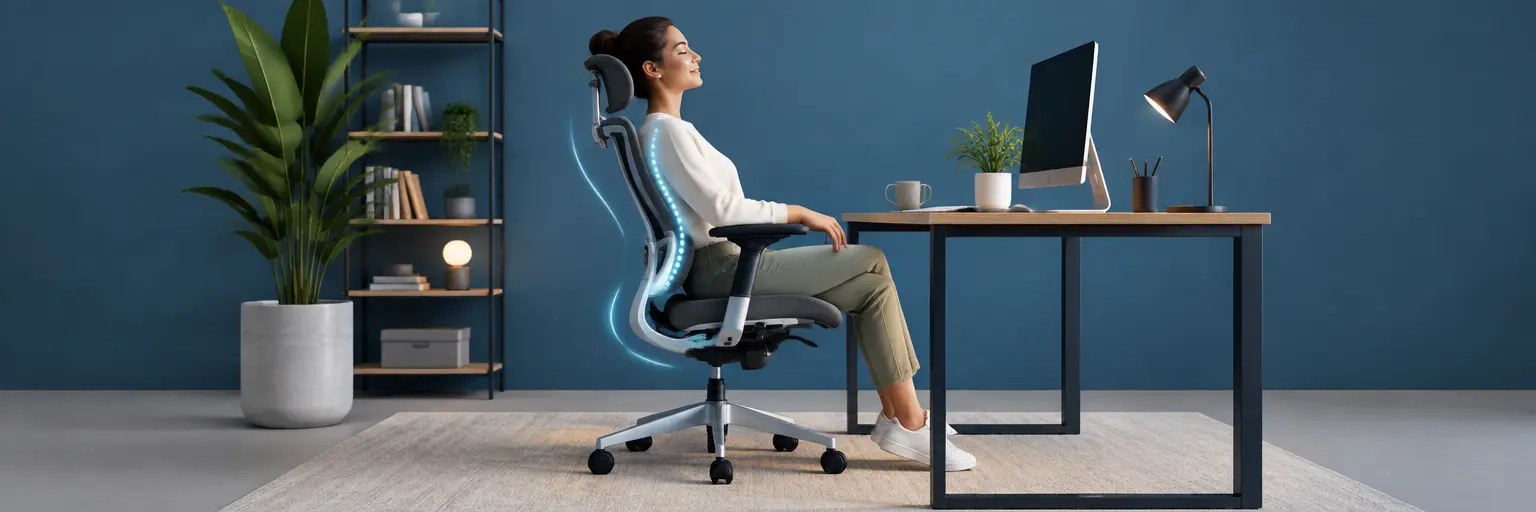
Transform your workspace into a haven of support and focus with the best ergonomic office chairs designed to banish back pain, boost posture, and keep you productive for hours. Whether you’re deep in a remote work marathon or tackling side projects, the right chair isn’t a luxury—it’s a game-changing life hack for your daily routine. Discover key features like adjustable lumbar support, breathable mesh, and dynamic recline mechanisms that adapt to your body, not the other way around. From budget-friendly picks to premium executive models, we break down comfort science to help you sit smarter, move more, and crush your to-do list without the stiffness. Your back will thank you, and your productivity will soar.
🤔 Stop wasting time and money on uncomfortable chairs! This "Best ergonomic chair buying guide" reveals the critical features to prioritize for…
Read article
🤔 Unlock peak performance with the surprisingly simple solution: an ergonomic chair. Proper posture and support dramatically boost focus and energy, transforming…
Read article
😊 Suffering from back pain? This guide reveals how to choose the best ergonomic chair for posture, maximizing comfort and productivity. Discover…
Read articleWelcome to UltimateLifeHacks' dedicated guide on ergonomic home office furniture, zeroing in on the single most impactful upgrade for your daily productivity and physical well-being: the ergonomic office chair. If you’re spending 8+ hours seated, your chair isn’t just furniture—it’s your primary support system for posture, circulation, and focus. Below, we break down what to look for, how to match features to your body type, and why investing in lower-back support is a life hack that pays dividends in energy and reduced pain.
Lumbar support is non-negotiable when choosing an ergonomic chair. Without it, your lower spine collapses into a C-shape, straining discs and muscles. The best chairs offer adjustable lumbar depth (how far the pad pushes into your back) and height so you can target the natural curve of your spine. Look for models with a 4D lumbar system—up/down, in/out, and angle—to mimic standing posture while seated.
For a budget-friendly option, a chair with passive lumbar foam that contours to your body can work if you’re lighter. However, for persistent back issues, choose active lumbar tension that you can tighten or loosen on the fly. Pro tip: sit against the backrest fully, then adjust the pad until you feel a firm, comfortable pressure at your belt line—that’s your sweet spot. This single feature reduces fatigue and keeps your core engaged during long work sessions.
Seat depth dictates where your thighs rest relative to the edge of the cushion. When the seat is too long, it presses behind your knees, cutting off circulation and causing numbness. The ideal depth leaves 2–4 fingers of space between the back of your knees and the seat front. Adjustable slider seats (usually 5–7 cm range) let you place your feet flat while your knees remain at a 90-degree angle.
Tilt adjustments are equally vital. A forward tilt (5–10 degrees) opens your hip angle, reducing pressure on the tailbone and making you lean into work—great for typing. A recline tilt with lockable positions (up to 30 degrees) lets you alternate between active and resting postures. Look for a synchronous tilt mechanism where the seat and backrest move together, mimicking natural hip movement. This dynamic motion reduces static muscle fatigue and boosts micro-circulation in your legs.
Armrests are often overlooked, yet they carry the weight of your arms and shoulders. A fixed armrest that’s too high forces your shoulders to shrug; too low lets your elbows drop, causing a forward lean. The gold standard is 4D armrests—height, width, depth, and rotation—so you can park them exactly under your elbows while your forearms rest parallel to the floor. For multi-tasking, three-axis armrests with pivot ability let you tuck them under your desk when writing.
If you switch between mouse and keyboard, ensure armrests are width-adjustable (slide inward for typing, outward for mouse work). Some premium chairs offer gel-coated or memory-foam tops that spread pressure, preventing tennis elbow. Avoid chairs with no armrests unless you have a standing desk routine; otherwise, your shoulders will take the strain. Test by sitting naturally—your elbows should hover at 90 degrees with no lift needed to reach the armrest surface.
Material affects heat buildup, durability, and how much you sweat after a 4-hour meeting marathon. Mesh backrests are the top pick for hot climates—they offer epic airflow, prevent sticky backs, and provide flexible support that adapts to your spine’s contour. The downsides: cheaper mesh loses elasticity over time, and firm mesh can dig into soft tissues. Choose high-density, breathable mesh with a tension adjustment dial.
High-density foam seats (2.5–3.5 lbs per cubic foot) provide plush comfort but retain heat; look for a breathable fabric cover like 3D knit that wicks moisture. Leather or bonded leather looks exec but traps sweat and cracks in sun—avoid for full-time use. For hybrid comfort, consider a foam seat base with a mesh backrest. Test for sinking—a chair that compresses too deeply under your weight will bottom out and harm hip joints.
Every ergonomic chair is designed for a specific user envelope. Check the weight rating (usually 200–400 lbs) and height range (seat height from floor—usually 16–22 inches). If you’re 5’3”, a standard chair with a 20-inch minimum might make your feet dangle, defeating ergonomic alignment. Conversely, a 6’5” person needs extra-long backrests and a taller seat range to avoid hunching.
Also factor in seat width—measure your hips at the widest point; add 2 inches for the ideal seat pan width. For big-and-tall users, look for reinforced gas lifts, wider base (over 27 inches), and higher backrests that support upper shoulders. Always consult the spec sheet for “recommended user height,” not just weight. Trying before buying (even at a showroom) helps, but if online, search for user reviews from someone with similar proportions to avoid returns.
On UltimateLifeHacks, we recommend starting around $200–$300 for a chair with adjustable lumbar, seat depth, and tilt. Below that, materials wear out fast. Look for sales on refurbished Steelcase or Herman Miller models around $500 if you need premium support without the $1,000+ price tag.
Generally, 7–10 years for high-end models and 2–3 years for budget ones. If you feel foam bottoming out, wobble in the base, or lumbar support that won’t hold position, it’s time. Replace cushion foam sooner if you exceed the weight capacity.
No—a chair is a tool, not a cure. You still need desk height alignment (elbows at 90°, monitor at eye level) and frequent micro-breaks. Use a footrest if your feet don’t reach the floor. The chair reduces strain, but your movement habits matter more.
Only if you recline for rest or have neck issues. While typing upright, a headrest may push your head forward. Look for an adjustable-height headrest that you can remove or move out of the way. It’s exceptional for short breaks during long tasks.
Gaming chairs often mimic racing buckets with high side bolsters that restrict arm movement, while ergonomic chairs focus on spinal alignment, adjustable curves, and breathable materials. Some high-end gaming chairs now include lumbar support, but for full-day work, true ergonomic chairs are almost always better for health.